Page 1 of 1
New "kicktraq" and "kickup" BBcode macros
Posted: Thu Feb 06, 2014 11:22 pm
by Mike Ratledge
I wrote a simple BBcode widget named "kicktraq" to support us adding a mini-page from Adam's Kicktraq website for funding projects, especially in the "Kickstarter funding/active" thread, and I handed MonteCarloJoe the keys to limited admin access, and he wrote a killer BBcode macro he named "kickup" that allows you to build a quick single-entry panel with green shading and balanced spacing left-to-right and top-to-bottom from the "kicktracker" sheet and the "kicktraq" sheets both side-by-side. This looks especially good for projects that are funding! I replaced a few within the past couple of minutes. We'll want to change to the new BBcode "kickup" macro Joe wrote - it's a stellar example of using the BBcode phpBB allows us to create fancy widgets and displays! (and it uses the default "Lucid Lime" UC colors that are featured on the forums)
For example, look at either the "Origins" or "Requiem" decks which are active/funding right now: they now contain the new extremely informational dual panel that contains both the kickstarter.com panel and the kicktraq mini-page side-by-side. For an example, here's the Origins KS project dual panel:
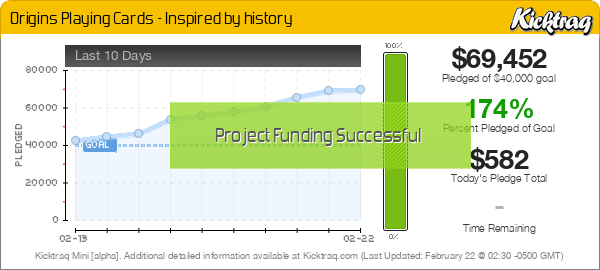
Fabulous, right? Let's all give Joe a vote of confidence, he did something truly incredible when I challenged him to "go to the next level", and went way above it! The old "kickstarter" (and "kicktraq") BBcode macros are still there in case you need just one or the other, but the new "kickup" BBcode macro he wrote should be used for all OP (original post) messages about new decks funding on Kickstarter.com - it just gives everyone so much more information.
Joe's next project was the "Friends of UC" donation page. He created a BBcode that handles all of those transactions without having to go to another website first. Of course, you still get redirected to "PayPal" to complete the transaction - I don't think that's optional.
Re: New "kicktraq" and "kickup" BBcode macros
Posted: Thu Feb 06, 2014 11:40 pm
by th4mo
Love it!
excellent work Joe!

Re: New "kicktraq" and "kickup" BBcode macros
Posted: Fri Feb 07, 2014 7:30 am
by montecarlojoe
Cheers guys - I also had a go at fixing the Kickstarter widgets so we don't get that annoying scrollbar down the rioght hand side - hopefully that worked for everyone!
(Incidentally, the new widget is diesigned for modern HTML5 browsers - older browsers may not have the curved corners or middle allgnment)
Re: New "kicktraq" and "kickup" BBcode macros
Posted: Fri Feb 07, 2014 11:43 am
by CBJ
Joe...
Let's see if you can work your magic with something else.
Back on UC.net, and before BMPoker took over UC.com.... If you uploaded a pic that was over 800 pixels wide, somehow the forum would convert it like this...
Let's say it was 1600 pixels wide, it would show the whole picture at 800 pixels on the forum, and if you clicked on it.. it would open a new window and show it full size.
Do you get what I mean?
Re: New "kicktraq" and "kickup" BBcode macros
Posted: Fri Feb 07, 2014 11:56 am
by flyers3003
Mike and Joe,
I really like the view, but I was just wondering if we can show the "trending" graph from Kicktraq rather than the "last 10 days". Maybe it's just me, but I prefer that graph.
John
Re: New "kicktraq" and "kickup" BBcode macros
Posted: Fri Feb 07, 2014 12:17 pm
by Mike Ratledge
flyers3003 wrote:Mike and Joe,
I really like the view, but I was just wondering if we can show the "trending" graph from Kicktraq rather than the "last 10 days". Maybe it's just me, but I prefer that graph.
John
I don't see why not, I hadn't really even paid much attention to the fact that it's not the one I'm used to seeing. I'm pretty certain it would only take a minor tweak - but I don't want to touch all the pretty code Joe cobbled up. It doesn't look fragile, but the exact working inside are beyond my ken.
Joe - I tend to agree - the 'other' Kicktraq chart is more useful in general, since it shows "Percent funded", "donated today", "trending to" amount, etc.
Re: New "kicktraq" and "kickup" BBcode macros
Posted: Fri Feb 07, 2014 1:59 pm
by flyers3003
Looking at Kicktraq, I see where they provide HTML, BBCode or Reddit Code on the Mini Chart Tab. Based on the fact that their code refers to "minichart.png", I would think we would be able to change the code to replace "minichart.png" with "dailychart.png" or any other chart they show.
Re: New "kicktraq" and "kickup" BBcode macros
Posted: Fri Feb 07, 2014 2:51 pm
by Mike Ratledge
flyers3003 wrote:Looking at Kicktraq, I see where they provide HTML, BBCode or Reddit Code on the Mini Chart Tab. Based on the fact that their code refers to "minichart.png", I would think we would be able to change the code to replace "minichart.png" with "dailychart.png" or any other chart they show.
It's already been done, maybe an hour or two ago, now... You should be seeing the 'right' chart now.
Re: New "kicktraq" and "kickup" BBcode macros
Posted: Fri Feb 07, 2014 4:10 pm
by montecarlojoe
The iframe width was cutting off the wider daily chart - fixed by simplifying a bit. Should still centre up nicely with a kickstarter widget though.
I have also extended the syntax - if you want the minichart (or any other chart) use the tag like this: [kicktraq=minichart]
Valid char types are:
minichart
dailychart
dailypledges
dailybackers
dailycomments
(am leaving the experimental ones for now - they will work but will display funny)
CBJ - I turned on thumbnail generation for images with a max width of 800px - hopefully that did the trick.
Re: New "kicktraq" and "kickup" BBcode macros
Posted: Fri Feb 07, 2014 4:13 pm
by flyers3003
Nope, not working. The kickup widget is still showing the "minichart":
However, it looks like the change was made to the kicktraq widget, but it has an error:

Inspecting the code it looks like this is the problem:
<img id="KTW" style="margin: 55px 0px; height: 270px;" src="https://www.
kickstarter.com/projects/rickdavidson/origins-playing-cards-inspired-by-history/dailychart.png">
That should probably say kicktraq instead.
Re: New "kicktraq" and "kickup" BBcode macros
Posted: Fri Feb 07, 2014 4:22 pm
by montecarlojoe
So it should... original use of the

i can change the flashy widget too - but it will become SUPER wide...
EDIT:
Here you go - the [kickup] tag will use minichart by default - but use [kickup=dailychart] for it to use the dailychart etc.
(you can use exp-cone and exp-trend but they dont resize right...yet) EDIT: Yeah they do!

[kickup=minichart]
https://www.kickstarter.com/projects/ri ... by-history[/kickup]
[kickup=dailychart]
https://www.kickstarter.com/projects/ri ... by-history[/kickup]
[kickup=expcone]
https://www.kickstarter.com/projects/ri ... by-history[/kickup]
Weird - they look right in the preview... FIXED!
Re: New "kicktraq" and "kickup" BBcode macros
Posted: Fri Feb 07, 2014 4:47 pm
by flyers3003
Figures, my previous response was going on while you were already updating
. This is very cool. Awesome job Joe!
Re: New "kicktraq" and "kickup" BBcode macros
Posted: Fri Feb 07, 2014 4:57 pm
by MagikFingerz
flyers3003 wrote:This is very cool. Awesome job Joe!
Seconded. It's stuff like this that makes a forum stand out against others

Re: New "kicktraq" and "kickup" BBcode macros
Posted: Fri Feb 07, 2014 10:49 pm
by volantangel
Guys the widgets doesn't work in mobile though.. Doesn't work on both the iPad or iPhone
Re: New "kicktraq" and "kickup" BBcode macros
Posted: Sat Feb 08, 2014 11:00 am
by montecarlojoe
VA helped me identify the problem and I tweaked the design - if your browser is too small to support the "side by side" configuration it will stack the elements instead.
This has been done with the default minichart in mind - no guarantees witht eother char types with the wider graphs
Re: New "kicktraq" and "kickup" BBcode macros
Posted: Mon Feb 10, 2014 12:14 pm
by Mike Ratledge
volantangel wrote:Guys the widgets doesn't work in mobile though.. Doesn't work on both the iPad or iPhone
Oddly enough it does exactly like Joe expects (next message) on my Galaxy S4 (Android-based) smartphone. They just display "stacked" on top of each other instead of side-by-side centered top-to-bottom. Looks fine, though - no problem here. Interesting that iOS would do something otherwise, I haven't seen very many HTML coded pages that don't work on my smartphone. What browser are you using? (I'm betting the internal / built-in one?) Try Firefox and see what you get - I'm betting it's in the browser. My Chrome and Dolphin browsers also show roughly the same thing.
Re: New "kicktraq" and "kickup" BBcode macros
Posted: Mon Feb 10, 2014 3:25 pm
by montecarlojoe
It was doing it in all browsers too narrow - the stacking thing was the fix - (tested on iPad too)
The other graphs don't adjust as well, but I can get to that - just means a bit of JS scripting...
Re: New "kicktraq" and "kickup" BBcode macros
Posted: Mon Feb 17, 2014 12:49 pm
by Kicktraq
You guys are awesome

Re: New "kicktraq" and "kickup" BBcode macros
Posted: Mon Feb 17, 2014 8:28 pm
by Mike Ratledge
Finally got around to fiddling with this - the different graphs should rearrange correctly in different sized screens (just resize your browser to test it out:
Any of the following can be used:
minichart
dailychart
dailypledges
dailybackers
dailycomments
expcone
exptrend
(for the exp-cone and exp-trend graphs leave out the hyphen)
Code: Select all
[kickup=minichart]https://www.kickstarter.com/projects/rickdavidson/origins-playing-cards-inspired-by-history[/kickup]
[kickup=minichart]
https://www.kickstarter.com/projects/ri ... by-history[/kickup]
Code: Select all
[kickup=dailychart]https://www.kickstarter.com/projects/rickdavidson/origins-playing-cards-inspired-by-history[/kickup]
[kickup=dailychart]
https://www.kickstarter.com/projects/ri ... by-history[/kickup]
Code: Select all
[kickup=expcone]https://www.kickstarter.com/projects/rickdavidson/origins-playing-cards-inspired-by-history[/kickup]
[kickup=expcone]
https://www.kickstarter.com/projects/ri ... by-history[/kickup]
Re: New "kicktraq" and "kickup" BBcode macros
Posted: Fri Feb 21, 2025 1:33 pm
by kevork
I am no tech guru but would it be possible for someone to take a look at the kickup plugin that was coded by Mike and see why the widget doesn't properly work anymore when it's a notification link? As soon as the project launches, the plugin works properly. Otherwise, it's just a gray and empty rectangle placeholder.
Perhaps the code can be pasted here for multiple minds to take a look.
Re: New "kicktraq" and "kickup" BBcode macros
Posted: Fri Feb 21, 2025 8:01 pm
by Timmargh
kevork wrote: ↑Fri Feb 21, 2025 1:33 pm
I am no tech guru but would it be possible for someone to take a look at the kickup plugin that was coded by Mike and see why the widget doesn't properly work anymore when it's a notification link? As soon as the project launches, the plugin works properly. Otherwise, it's just a gray and empty rectangle placeholder. [...]
It's most likely because there is no data available before the launch. I mean, why would there be?

Re: New "kicktraq" and "kickup" BBcode macros
Posted: Fri Feb 21, 2025 9:19 pm
by kevork
Timmargh wrote: ↑Fri Feb 21, 2025 8:01 pm
It's most likely because there is no data available before the launch. I mean, why would there be?
Correct, kicktraq would have no data to pull, but it used to at least show the image from KS on the top widget and say "launching soon." That portion broke sometime in 2022-2023.